Cloudflare
Cloudflare is a web performance and security platform that provides services like CDN, DDoS protection, and DNS. It helps organizations make their websites faster, more secure, and reliable.
Before you begin
To begin monitoring Cloudflare, ensure you have the following components and permissions in place:
- OpenLM components: OpenLM Cloud Broker, approved in Broker Hub.
- Platform-specific Requirements: You'll need administrative access to your Cloudflare account to generate a Global API Key or specific API tokens with read permissions for analytics and user data.
Configure data collection
Determine if you want a user token or an Account API token. Use Account API tokens if you prefer service tokens that are not associated with users and your desired API endpoints are compatible.
From the Cloudflare dashboard ↗, go to My Profile → API Tokens for user tokens. For Account Tokens, go to Manage Account → API Tokens.
Select Create Token.
Modify the token's permissions. After selecting a permissions group (Account, User, or Zone), select what level of access to grant the token. Most groups offer Edit or Read options. Edit is full CRUDL (create, read, update, delete, list) access, while Read is the read permission and list where appropriate. Refer to the available token permissions for more information.
Select which resources the token is authorized to access. For example, granting Zone DNS Read access to a zone example.com will allow the token to read DNS records only for that specific zone. Any other zone will return an error for DNS record reads operations. Any other operation on that zone will also return an error.
(Optional) Restrict how a token is used in the Client IP Address Filtering and TTL (time to live) fields.
Select Continue to summary.
Review the token summary. Select Edit token to make adjustments. You can also edit a token after creation.
Select Create Token to generate the token's secret.
Copy the secret to a secure place.
- Add Credentials: In the OpenLM Cloud Broker dashboard, find the Cloudflare integration and enter the account ID and API token.
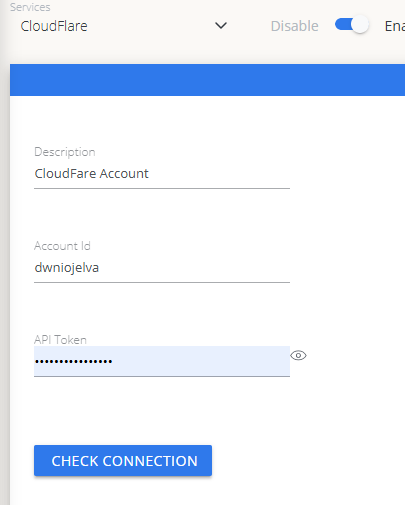 Cloudflare credential configuration in Cloud Broker
Approve Cloudflare in OpenLM Platform
- Sign in to OpenLM Platform.
- From the menu, go to License Servers → Pending Server.
- Select the Cloudflare data source, then select Approve and Merge.
Verify the integration
- In OpenLM Platform, go to Allocation.
- Confirm Cloudflare usage data appears.
It can take up to 3 minutes for data to appear after approval.
Viewing reports
- User activity trends — see which users are most active in the platform; reallocate seats accordingly.
- Expired or unused licenses — identify inactive users and reclaim their seats.