Active Users
The Active User Report provides a detailed view of active license users, showing time-wise active user counts alongside session details. It tracks how many unique users accessed licensed features during each time period and lists user-specific activities. This report helps monitor licensing activity, identify peak usage periods, and analyze user behavior across departments and servers.
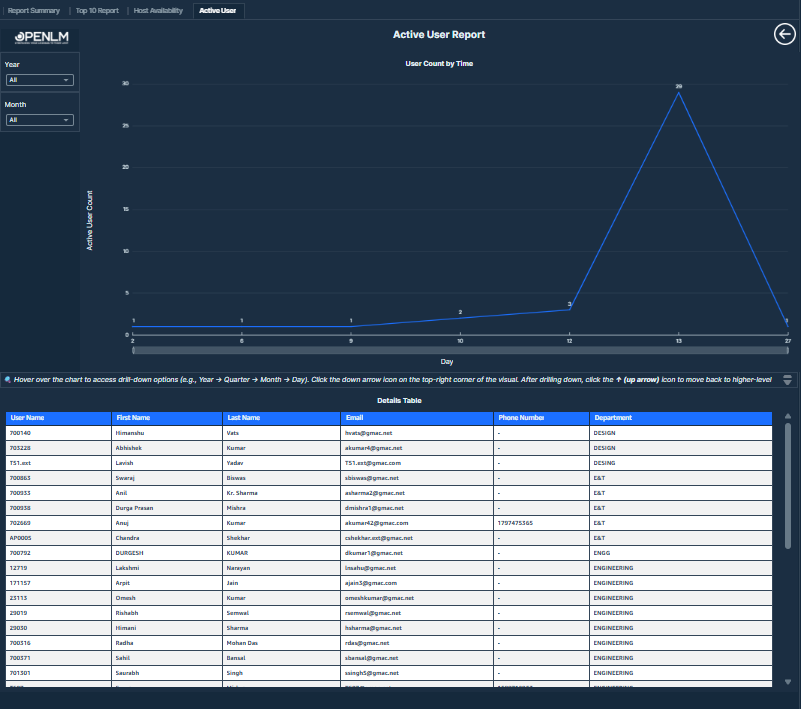 Active User Report showing time-wise active user count and detailed user session data for license usage monitoring and analysis.
Visualizations
- Active User Count by Time: This bar chart displays the number of active users over time. The X-axis represents selected time intervals such as years, quarters, months, or days. The Y-axis shows the count of unique active users. Users can drill down into specific time periods by selecting data points in the chart, revealing detailed session-level records for that timeframe like day, month, quarter, and year.
Values displayed:
-
Time
-
Active User Count: Active Users are those who are in active sessions currently. More technically, the end time of the sessions held by these users is NULL. Active User Count is calculated by counting the number of distinct active users.
-
Active User Details Table: This interactive table lists detailed active user activity.
Values displayed:
- User ID: Unique identifier of the user.
- First Name & Last Name: User's first and last name.
- Email & Phone: Contact information (if available).
- Department: Department of the user.
- License Server: Server managing the license allocation.
- Group Name: Group of the user.
- Feature Name: Licensed feature or software in use.
- Host Name: Source machine or host accessing the license.