Currently consumed licenses
A live report showing all licenses that are currently active and in use. It provides real-time visibility into license consumption.
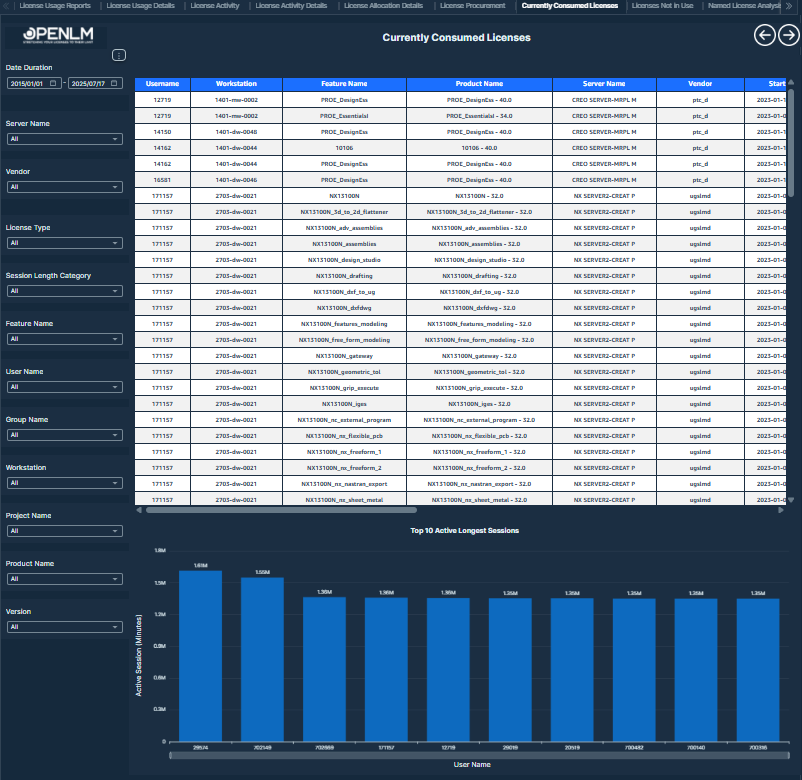 Currently Consumed Licenses
This table displays the current license consumption details, including user activity, license attributes, and usage duration. Further, Top 10 Active Sessions by Duration (Minutes) Mapped to Users for High-Usage Insight.
Visualizations
- Currently Consumed Licenses Table: This table provides a detailed view of currently consumed license sessions through a tabular layout. It includes essential information such as the user's identity, license feature details, associated product metadata, session start time, workstation and IP, as well as usage duration and idle time. The data helps monitor active consumption in real time.
Values displayed:
-
Username
-
Vendor
-
Feature Name
-
Product Name
-
Version
-
Project Name
-
Group Name
-
Additional Key
-
Start Time
-
IP
-
Workstation
-
Session Duration
-
Server Name
-
License Type
-
Total Number of Licenses
-
Borrowed
-
Idle Time
-
Top 10 Active Longest Sessions Chart: This diagram highlights the most actively used sessions by displaying the highest active session durations in minutes, mapped to individual users. Use it to spot high-usage patterns quickly and support efficient license allocation.
Values displayed:
-
Active Session (Minutes)
-
Username
-
Filters:
-
Date Duration: Users can select any date range within a rolling 10-year window - from 1st January 2015 to 17th July 2025 - using this filter.
-
Version: Users can select any version from this filter.
-
Server Name: Users can select any server name from this filter.
-
License Type: Users can select any license type from this filter.
-
Feature Name: Users can select any feature name from this filter.
-
Product Name: Users can select any product name from this filter.
-
Vendor: Users can select any vendor from this filter.
-
Username: Users can select any username from this filter.
-
Project Name: Users can select any project name from this filter.
-
Session Length Category: Users can select any session length category from this filter.
-
User Country: Users can select any user country from this filter.
-
Additional Key: Users can select any additional key from this filter.
-
Group Name: Users can select any group name from this filter.
-
Workstation: Users can select any workstation from this filter.