License Activity
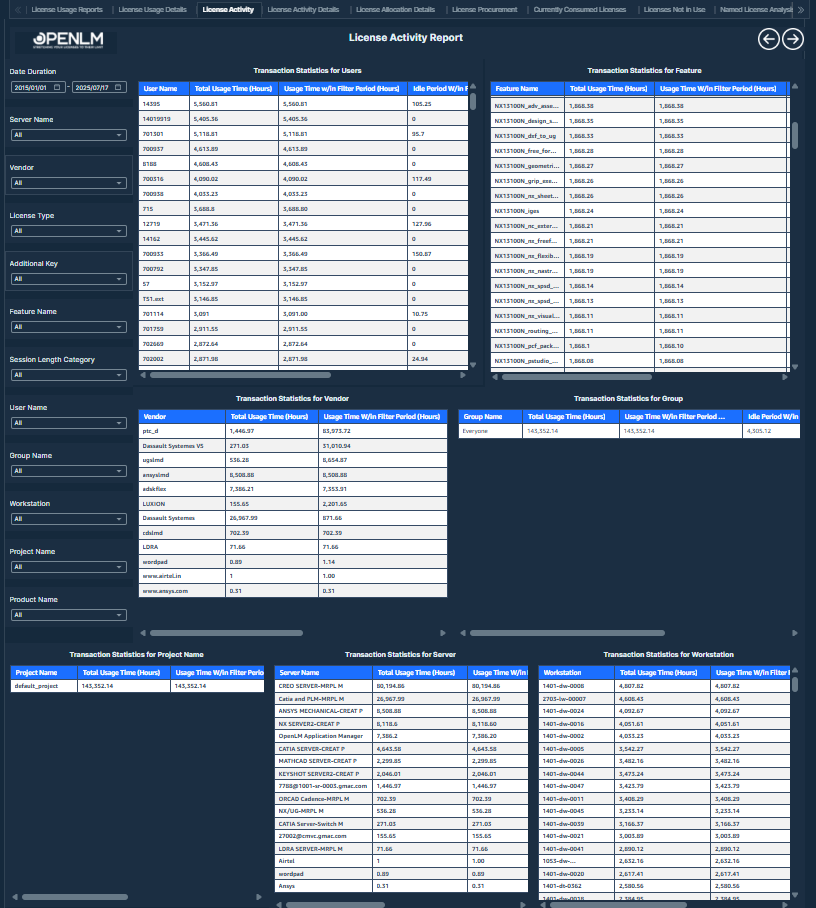
This report provides the total usage time (hours), idle time (hours), and actual usage time (hours) for different categories such as Users, Features, Vendors, Groups, Projects, Servers, and Workstations.
 License Activity
Displays detailed session data showing total usage (with and without filter period), idle time, and actual usage time (hours) for each grouped user or session, helping analyze efficiency and utilization trends.
Visualizations
- Transaction Statistics Visuals: These visuals provide a detailed breakdown of transaction statistics, grouped across multiple dimensions: User, Feature, Server, Vendor, Group, Project, Server, and Workstation. It offers visibility into how teams consume licenses across the organization from different perspectives.
Values displayed (for each grouping):
-
Total Usage Time without Filter Time Period (Hours): Lists total usage time (hours) and ignores time filters.
-
Usage Time Within Selected Time Period (Hours): Lists filtered usage time (hours) for the selected time period. When you do not select a period, this value matches Total Usage Time without Filter Period (Hours).
-
Idle Period Within Selected Time Period (Hours): Lists filtered idle time (hours) for the selected time period.
-
Actual Usage Time Within Selected Time Period (Hours): Lists the actual usage time (hours) calculated as total usage time minus idle time within the selected period.
-
Filters:
-
Date Duration: Users can select a custom start and end date to analyze license activity. The system strictly enforces filter boundaries. If a transaction extends beyond the selected end date, only the usage up to the selected end date is considered in calculations.
-
Server Name: Users can select any server name from this filter.
-
Vendor: Users can select any vendor from this filter.
-
License Type: Users can select any license type from this filter.
-
Additional Key: Users can select any additional key from this filter.
-
Feature Name: Users can select any feature name from this filter.
-
Session Length Category: Users can select any session length category from this filter.
-
Username: Users can select any username from this filter.
-
Group Name: Users can select any group name from this filter.
-
Workstation: Users can select any workstation from this filter.
-
Project Name: Users can select any project name from this filter.
-
Product Name: Users can select any product name from this filter.
License Activity details
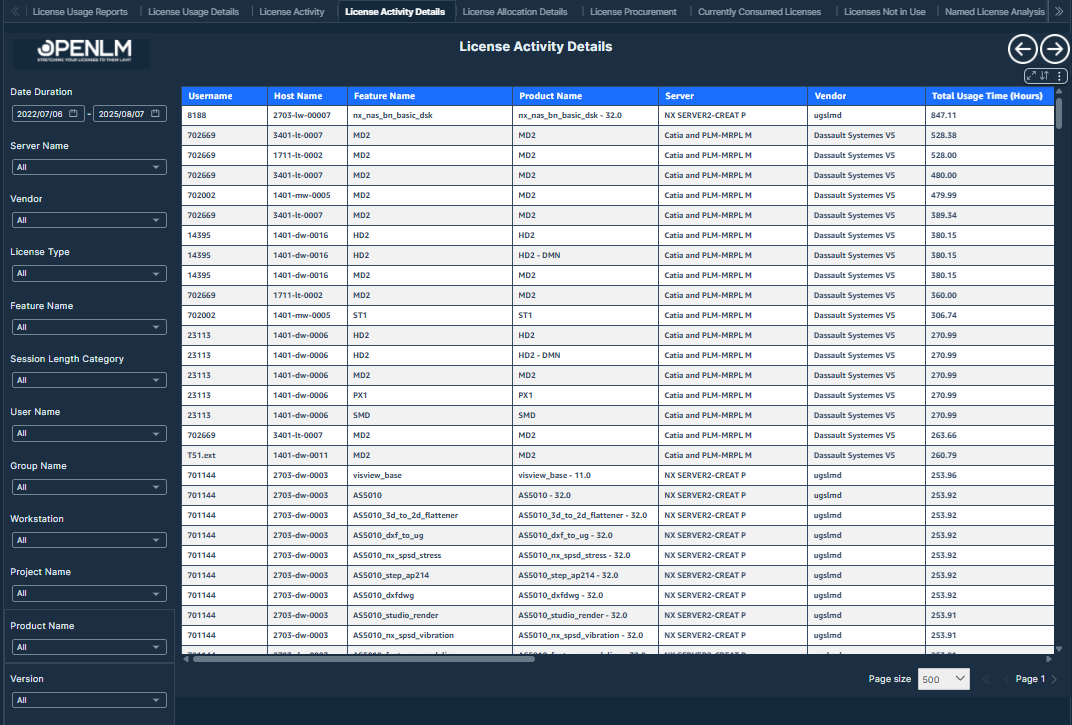
The License Activity Table provides a detailed view of individual user sessions, showing key information such as user details, session times, usage and idle durations, workstation info, and license specifics like vendor, server, license type, and feature version. It supports deeper analysis of license usage and user behavior.
 License Activity Details
Use these visualizations to explore license usage from multiple angles.
Visualizations
- License Activity Details Table: Use the drill-through feature to access detailed user information from the License Activity Report by navigating to the License Activity Details Table. This table provides a comprehensive overview of each record, including the user's name, contact information, session start and end times, total usage and idle time, and workstation details. It also captures key license data, such as vendor, server, license type, feature version, and any borrowed status, along with project, group, and department affiliations. Use this detailed view for in-depth analysis of individual license usage and resource management.
Values displayed:
-
Username
-
Country
-
First Name
-
Last Name
-
Email
-
Workstation
-
Start Time: The timepoint at which a session starts.
-
End Time: The timepoint at which a session ends.
-
Vendor
-
Server
-
License Type
-
Feature Name
-
Feature Version
-
Additional Key
-
Borrowed
-
IP
-
Product Name
-
Total Usage Time (Hours)
-
Project
-
Group
-
Idle Period (Hours)
-
Department
-
Filters:
-
Date Duration: Users can select any date range within a rolling 10-year window - from January 1, 2015 to July 17, 2025 - using this filter.
-
Version: Users can select any version from this filter.
-
Server Name: Users can select any server name from this filter.
-
License Type: Users can select any license type from this filter.
-
Feature Name: Users can select any feature name from this filter.
-
Product Name: Users can select any product name from this filter.
-
Vendor: Users can select any vendor from this filter.
-
Username: Users can select any username from this filter.
-
Project Name: Users can select any project name from this filter.
-
Session Length Category: Users can select any session length category from this filter.
-
User Country: Users can select any user country from this filter.
-
Group Name: Users can select any group name from this filter.
-
Workstation: Users can select any workstation from this filter.