CodeMeter
OpenLM は、増え続ける多種多様なライセンスマネージャーの監視をサポートしています。本ガイドでは、OpenLM Server を CodeMeter ライセンスマネージャーと連携させ、ライセンス使用状況を監視し、CodeMeter の統計を収集する方法を説明します。
はじめに
- OpenLM Platform
- CodeMeter と同じマシンにインストールされた OpenLM Broker v25.x 以降。Broker Hub で承認します。
監視機能
OpenLM Broker を CodeMeter と併用すると、次のことができます。
-
ライセンス総数、ライセンス使用状況データ、拒否(denials)を収集する。
-
OpenLM Server との通信をバッファリングし、一時的なネットワーク障害に対応する。
-
ライセンスマネージャーサービスをリモートで開始および停止する。
-
1 分単位の解像度でライセンス使用状況レポートを取得する。
-
拒否レポートを生成する。OpenLM は LIMIT REACHED タイプのみをサポートします。具体的には、CodeMeter のログファイル内のイベント WB0212(NO MORE LICENSES)が拒否として報告されます。
OpenLM Broker の設定
OpenLM Server が CodeMeter と同じマシンにインストールされていない場合は、ライセンス使用状況をローカルで照会するために、CodeMeter サーバーに OpenLM Broker をインストールします。
CodeMeter のロギングを有効にします。
Broker を設定するには、次の手順を実行します。
-
Broker Web UI を開きます:
http://localhost:5090→ License Managers タブ。 -
Add License Manager をクリックします。
-
CodeMeter のポート(既定: 22350)を入力します。Type から CodeMeter を選択します。Add をクリックします。
-
Commands で、CMU32.exe の場所(通常は C:\Program Files (x86)\CodeMeter\Runtime\bin)に実行ファイルのパスを設定します。Execute をクリックして照会をテストします。
-
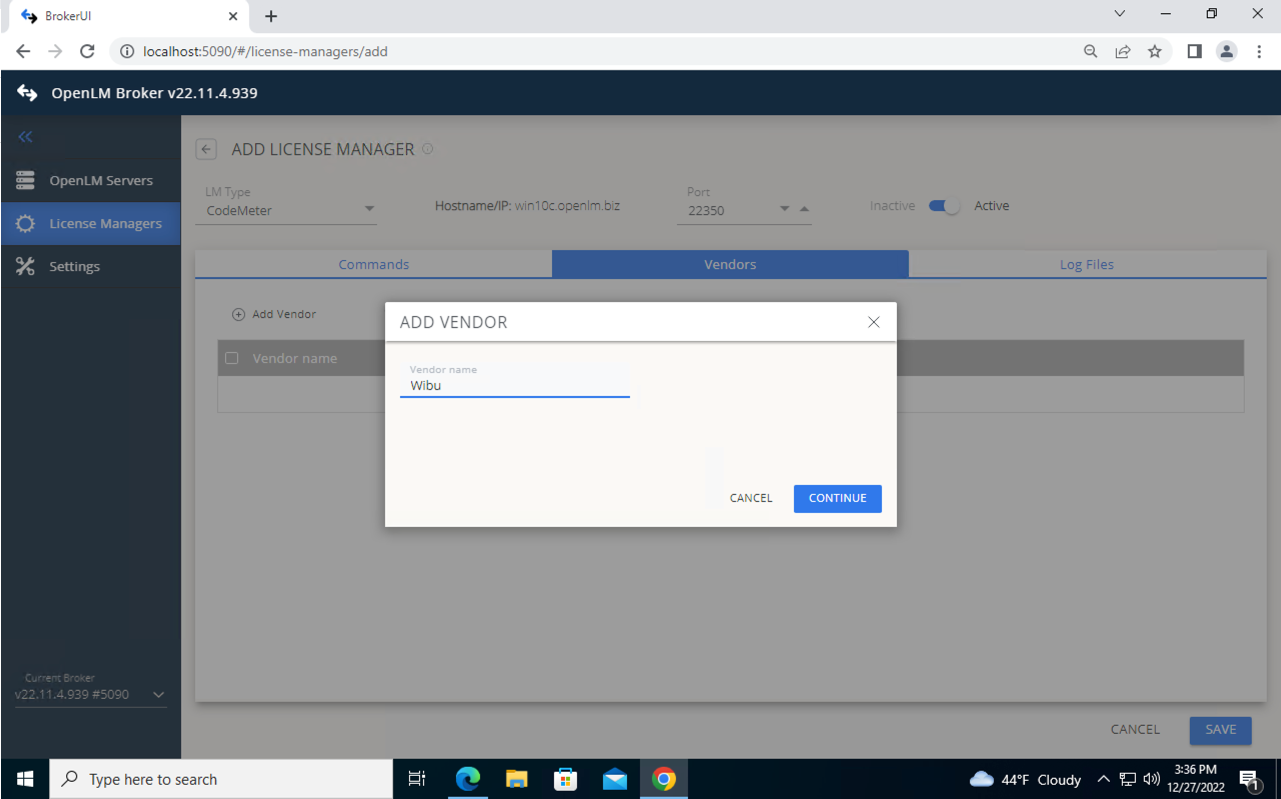
Vendors タブに移動します。Add Vendor をクリックし、ベンダー名を入力します。
-
Log Files タブに移動します。Add Log File をクリックします。CodeMeter のログファイルへのパス(既定: C:\Program Data\CodeMeter\Logs)を入力します。
- Advanced を使用して、ファイルの読み取り頻度、データの上限、エンコーディング、ログローテーションの処理を設定します。
- ライセンスの拒否を追跡するには、Watch files by pattern をオンにします。
-
Continue をクリックします。
-
Save をクリックします。
 OpenLM Platform の設定
OpenLM Platform で CodeMeter を承認
- OpenLM Platform にサインインします。
- メニューから License Servers → Pending Server を開きます。
- CodeMeter ライセンスマネージャーを選択し、Approve and Merge をクリックします。
連携の検証
- OpenLM Platform で License Servers Live → Server Statistics を開きます。
- CodeMeter が緑のステータスで表示されることを確認します。
新規接続の場合、ステータスの反映まで最大 3 分かかります。