EPLAN
はじめに
- OpenLM Platform。
- EPLAN と同じマシンにインストールされ、Broker Hub で承認された OpenLM Broker v25.x 以降。
監視機能
OpenLM Broker 経由で EPLAN ライセンスマネージャーに対して利用できる監視機能は、次のとおりです。
| Report resolution | License totals | License usage | Denials reporting | Borrowed license reporting | Expiration date reporting | Multiple server redundancy |
|---|---|---|---|---|---|---|
| By second | Yes | Yes | Yes | Yes | No | No |
Broker を使用すると、ネットワーク中断時にもバッファリングされた通信が可能になります。
OpenLM Broker の設定
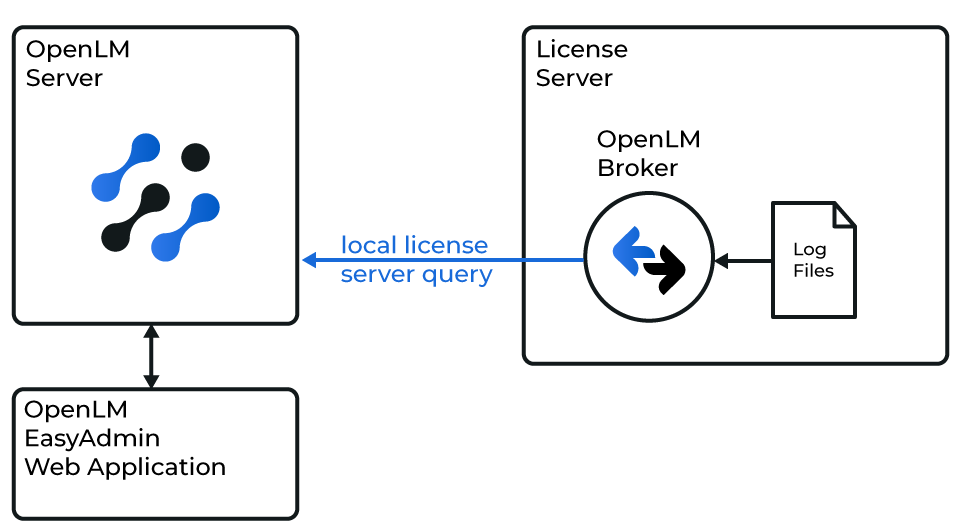 OpenLM と EPLAN ライセンスマネージャーの連携の概要図
処理は次のように行われます。
-
Broker は、設定された間隔で ElmMonitor.exe を実行し、ログファイルの一部を生成します。
-
これらの断片は 1 つのログファイルにまとめられ、その後 OpenLM Generic 形式の XML ファイルに変換されます。
-
Broker は、収集したすべてのライセンス使用状況情報を OpenLM Server に送信します。その後、OpenLM Web Interface でデータを確認できます。
手動で追加
-
最新バージョンの OpenLM Broker をインストールします。
-
Broker Web UI (http://localhost:5090/) にアクセスします。
-
License Managers タブに移動します。
-
ライセンスマネージャーサービスが実行されている場合は、Detect をクリックします。Broker が自動的に EPLAN ライセンスマネージャーを設定します。
-
Detect が機能しない場合は、次の手順に従います。
- License Managers タブで、Add License Manager をクリックします。
- LM タイプのドロップダウンリストから EPLAN を選択します。ポート番号 (例: 80) を入力します。Add をクリックします。
- 設定ウィンドウで、Commands タブに切り替えます。Executable path フィールドで ElmMonitor.exe を参照します。Execute をクリックして出力を検証します。
- Vendors タブに切り替えます。Add Vendor をクリックし、EPLAN (または別の名前) を入力して、Continue をクリックします。
- Save をクリックします。
OpenLM Platform で EPLAN を承認
- OpenLM Platform にサインインします。
- メニューから License Servers → Pending Server を開きます。
- EPLAN ライセンスマネージャーを選択し、Approve and Merge をクリックします。
連携の検証
- OpenLM Platform で License Servers Live → Server Statistics を開きます。
- EPLAN が緑のステータスで表示されることを確認します。
注意
新規接続の場合、ステータスの反映まで最大 3 分かかります。