JetBrains
本ガイドでは、OpenLM を使用して JetBrains Floating License Server (FLS) を監視し、ライセンス統計を取得する方法を説明します。
はじめに
JetBrains FLS をクエリするには、次をインストールしてください。
- OpenLM Platform。
- JetBrains FLS と同じマシンにインストールされ、Broker Hub で承認された OpenLM Broker v25.x 以降。
監視機能
次の表は、OpenLM Broker を通じて JetBrains FLS で利用できる監視機能を示しています。
| Report resolution | License totals | License usage | Denials | Borrowed licenses | Expiration dates | Redundancy |
|---|---|---|---|---|---|---|
| By minute | Yes | Yes | No | No | No | No |
Broker を使用すると、次のことも可能になります。
-
OpenLM Server とのバッファリングされた通信
-
ライセンスマネージャーサービスのリモートでの開始/停止
OpenLM Broker の設定
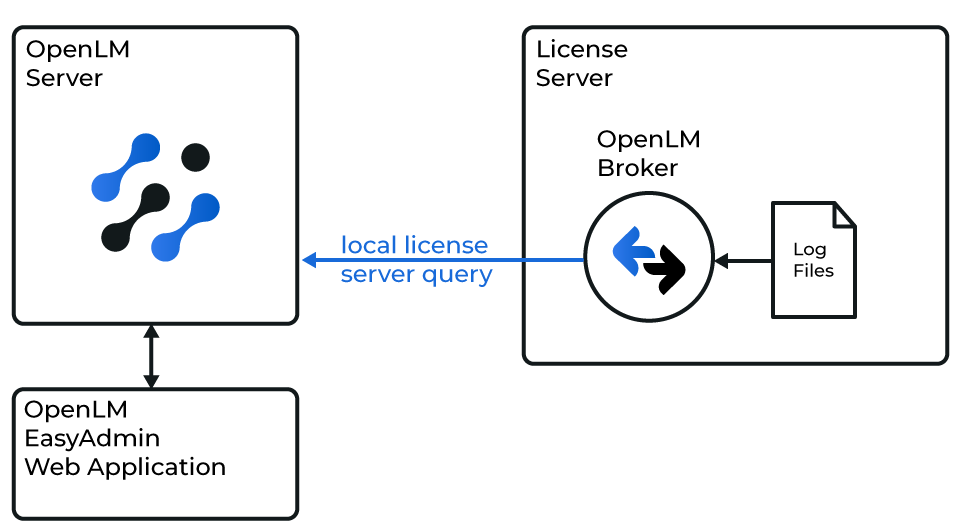 Broker は HTTP ポート経由でローカルから JetBrains FLS をクエリし、データを OpenLM Server に送信します。
続行する前に、Broker がインストールされ、OpenLM Server に報告するように設定されていることを確認してください。
JetBrains FLS トークンの取得
Broker がライセンス使用状況データを読み取るには、JetBrains のレポートトークンが必要です。
-
トークンがすでに設定されている場合、Broker の自動検出が service-config.properties からトークンを読み取ります。
-
トークンが設定されていない場合は、JetBrains のガイドに従ってください。トークンを保存してください。data_inquiry コマンドで必要になります。
Broker の手動設定
自動検出が失敗した場合:
-
Broker UI を
http://localhost:5090/で開きます。 -
License Managers → Add License Manager を開きます。
-
JetBrains FLS のポート(既定: 8080)を入力します。
-
Type から JetBrains を選択します。Apply をクリックします。
-
Commands で、コマンドの Update path を JetBrains FLS のルートフォルダーに設定します。Update → Apply をクリックします。
-
data_inquiry を開きます。
<TOKEN>を JetBrains のトークンに置き換えます。例:http://localhost:8080/licenses-report.json?token=283xxs8zumhttp://localhost:8080/tickets-report.json?token=283xxs8zumExecute → Apply をクリックします。
-
Vendors で、Vendor Name = JetBrains を設定します。Apply をクリックします。
-
Restart Broker をクリックします。
OpenLM Platform で JetBrains を承認
- OpenLM Platform にサインインします。
- メニューから License Servers → Pending Server を開きます。
- JetBrains ライセンスマネージャーを選択し、Approve and Merge をクリックします。
連携の検証
- OpenLM Platform で License Servers Live → Server Statistics を開きます。
- JetBrains が緑のステータスで表示されることを確認します。
新規接続の場合、ステータスの反映まで最大 3 分かかります。