LiMBR
本連携により、OpenLM で Lloyd's Register Licence Manager (LiMBR) のライセンス使用状況、拒否(denials)、貸出ライセンス、有効期限を監視できます。
はじめに
- OpenLM Platform
- LiMBR と同じマシンにインストールされた OpenLM Broker v25.x 以降。Broker Hub で承認します。
監視機能
| Report resolution | License totals | License usage | Denials reporting | Borrowed license reporting | Expiration date reporting | Multiple server redundancy |
|---|---|---|---|---|---|---|
| Start time: by second, end time: by minute | Yes | Yes | Yes | Yes | Yes | No |
さらに、OpenLM Broker を使用すると、バッファリングされた通信が可能になり、LiMBR サービスをリモートで開始または停止できます。
OpenLM Broker の設定
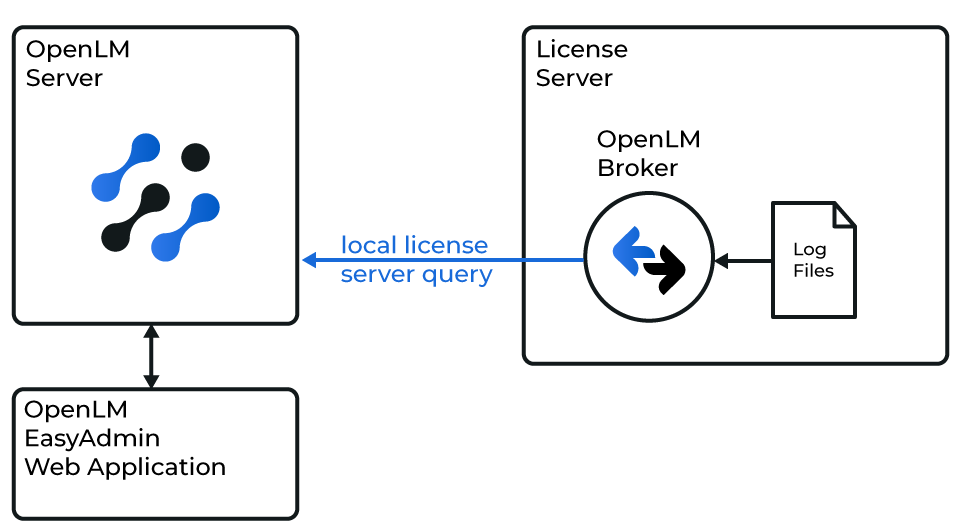 OpenLM と LiMBR の連携の概要
OpenLM Broker は、コマンドラインユーティリティを介してローカルで LiMBR に照会し、結果をコンパイルして OpenLM Server にデータを送信します。
続行する前に、OpenLM Broker をインストールし、OpenLM Server にレポートするように設定しておく必要があります。
自動設定
-
Broker 設定ツールで Detect をクリックします。
-
LiMBR が実行中の場合、Broker は必要な設定を含むポートノードを作成します。
-
Apply をクリックします。
-
Restart Broker をクリックします。
-
確認するには、Commands → data_query に移動し、Execute をクリックします。
 Broker UI での設定
 -
Broker UI を
http://localhost:5090/で開きます。 -
License Managers → Add License Manager に移動します。
-
License Manager Type を LiMBR に設定し、Apply をクリックします。
-
Commands で、LiMBR がインストールされているフォルダーを参照し、Update をクリックしてから Apply をクリックします。
-
status で、設定を確認します。
-
data_inquiry で Execute をクリックし、出力が正しいことを確認します。
-
Restart Broker をクリックします。
-
Vendors で、Vendor Name に LiMBR と入力し、Apply をクリックします。
-
もう一度 Apply をクリックします。
-
Restart Broker をクリックします。
OpenLM Platform で LiMBR を承認
- OpenLM Platform にサインインします。
- メニューから License Servers → Pending Server を開きます。
- LiMBR ライセンスマネージャーを選択し、Approve and Merge をクリックします。
連携の検証
- OpenLM Platform で License Servers Live → Server Statistics を開きます。
- LiMBR が緑のステータスで表示されることを確認します。
新規接続の場合、ステータスの反映まで最大 3 分かかります。