LS-DYNA
LS-DYNA は、Livermore Software Technology Corporation (LSTC) によって開発された有限要素シミュレーションツールです。LS-DYNA には、LS-OPT、LS_PREPOST、LS_TASC、THUMS などの周辺ツールが含まれます。これらを組み合わせることで、流体力学から自動車の安全性まで、幅広い物理シミュレーションの分野をカバーします。
LS-DYNA は、ネットワークライセンスの展開を制御するために専用のライセンスマネージャーを使用します。OpenLM を使用すると、ライセンスの使用率の確認、使用状況の統計とパターンの分析、アイドル状態のライセンスの管理を行うことができます。
OpenLM は、Flexera FLEXnet Publisher (FLEXlm) や Sentinel RMS など、複数のライセンスマネージャーをサポートしています。本ドキュメントでは、LS-DYNA ライセンスを監視するように OpenLM を設定する方法を説明します。
OpenLM Broker を使用してライセンスサーバーをローカルで照会し、その情報を OpenLM Server に転送します。
はじめに
- OpenLM Platform。
- LS-DYNA と同じマシンにインストールされ、Broker Hub で承認された OpenLM Broker v25.x 以降。
OpenLM Broker の設定
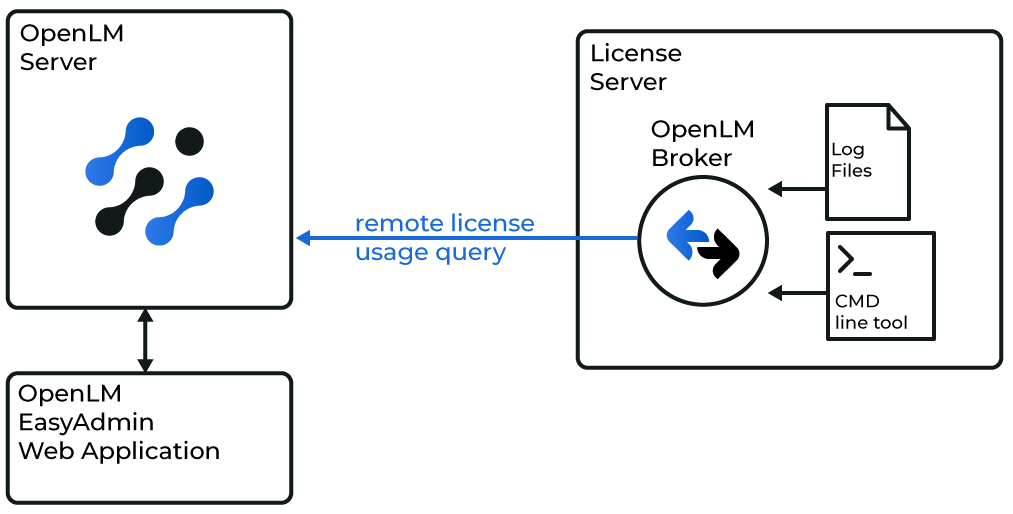 Broker と OpenLM Server の連携の概要図
LS-DYNA ライセンスサーバーのマシンに OpenLM Broker をインストールして設定します。Broker はライセンスサーバーをローカルで照会し、データを OpenLM Server に転送します。また、ネットワーク障害やセキュリティ制限を克服するために、バッファリングされた通信も提供します。
-
Broker UI を開きます:
http://localhost:5090/。 -
License Managers → Add License Manager に移動します。
-
Commands ノードで、lstc_qrun.exe のフルパスを入力します。
-
Apply をクリックします。
-
Vendors ノードに移動し、ベンダー名を入力します。
-
Restart Broker をクリックします。
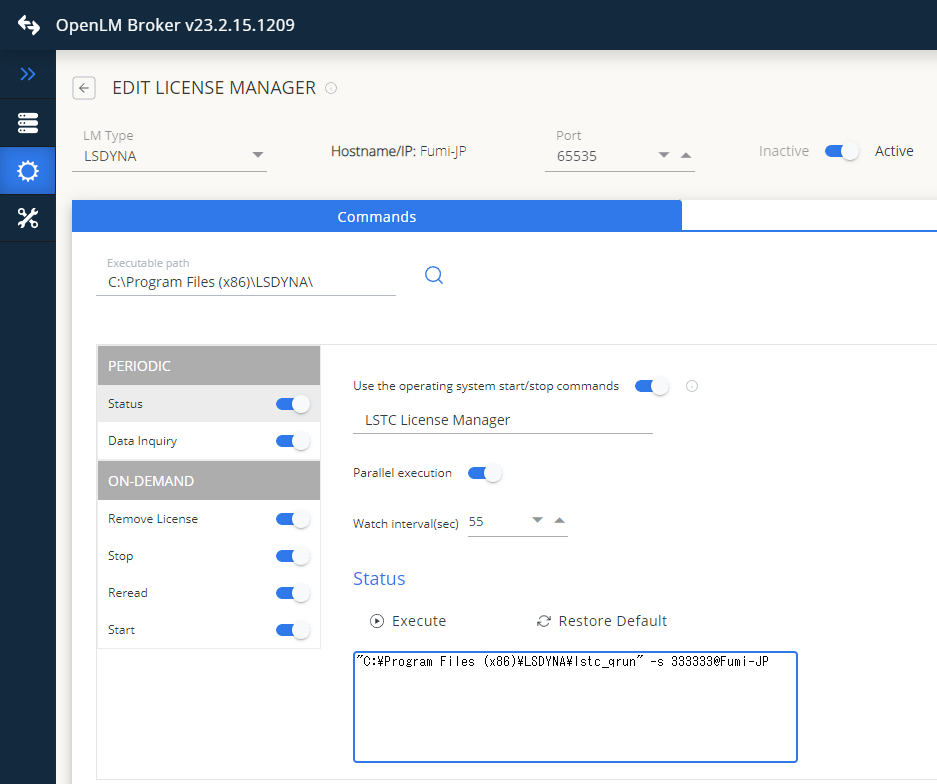 Broker Web UI での LS-DYNA の設定
OpenLM Platform で LS-DYNA を承認
- OpenLM Platform にサインインします。
- メニューから License Servers → Pending Server を開きます。
- LS-DYNA ライセンスマネージャーを選択し、Approve and Merge をクリックします。
連携の検証
- OpenLM Platform で License Servers Live → Server Statistics を開きます。
- LS-DYNA が緑のステータスで表示されることを確認します。
新規接続の場合、ステータスの反映まで最大 3 分かかります。