MathLM
OpenLM は、多種多様な、増え続けるライセンスマネージャーの監視をサポートしています。本ガイドでは、OpenLM を MathLM と連携させ、ライセンス使用状況を監視してライセンス統計を取得するための設定方法を説明します。
ローカルでクエリしてデータを OpenLM Server に転送するために、MathLM サーバーに OpenLM Broker をインストールします。
はじめに
-
OpenLM Platform。
-
MathLM と同じマシンにインストールされ、Broker Hub で承認された OpenLM Broker v25.x 以降。
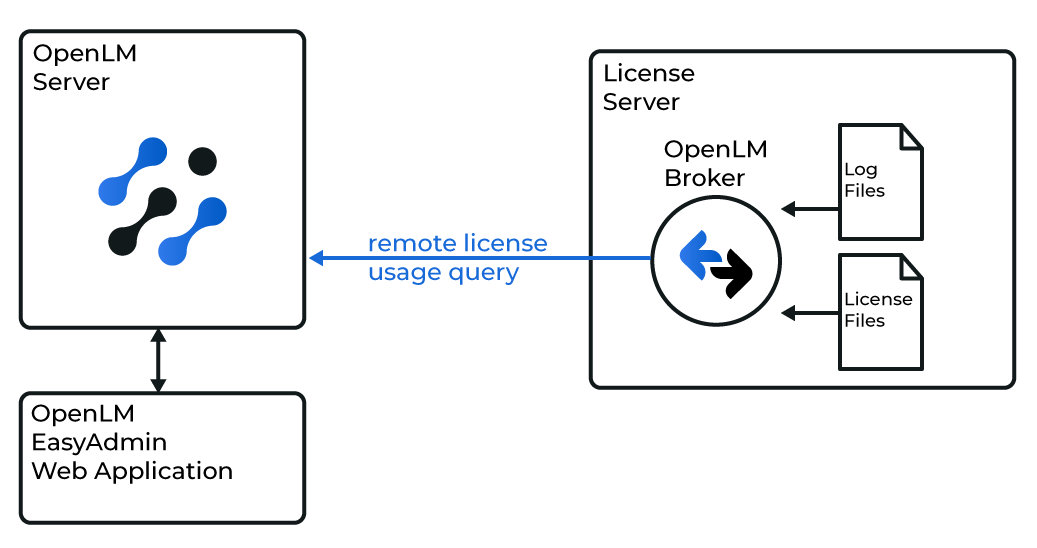 概要図: OpenLM Broker がローカルで MathLM をクエリ
OpenLM Broker は任意ですが、推奨されます。MathLM ホストにインストールすると、使用状況をローカルでクエリして OpenLM Server に転送します。Broker は、ネットワーク障害やセキュリティ制限が発生した場合でも、バッファリングされた通信を保証します。
Broker の自動設定
-
MathLM サーバーに最新バージョンの OpenLM Broker をダウンロードしてインストールします。
-
Broker UI を
http://localhost:5090/で開きます。 -
License Managers → Add License Manager を開きます。
-
OpenLM Web Interface で定義されているポートと同じポートで MathLM ライセンスサーバーを監視するように Broker を設定します。
-
status フィールドと data_inquiry フィールドに、monitorlm.exe へのフルパスを設定します。このパスは Commands で設定し、Update でグローバルに適用することもできます。
-
Apply をクリックし、続いて Restart Broker をクリックします。
OpenLM Platform で MathLM を承認
- OpenLM Platform にサインインします。
- メニューから License Servers → Pending Server を開きます。
- MathLM ライセンスマネージャーを選択し、Approve and Merge をクリックします。
連携の検証
- OpenLM Platform で License Servers Live → Server Statistics を開きます。
- MathLM が緑のステータスで表示されることを確認します。
新規接続の場合、ステータスの反映まで最大 3 分かかります。