Sentinel HASP
OpenLM は、増え続ける多種多様なライセンスマネージャーの監視をサポートしています。本ガイドでは、OpenLM を Sentinel HASP と連携させ、ライセンス使用状況を監視し、ライセンス統計を取得する方法を説明します。
OpenLM は Sentinel HASP バージョン 5.0 以降をサポートしています。バージョン 4 以前はサポートされていません。
はじめに
Sentinel HASP を照会するには、次を確認します。
- OpenLM Platform
- Sentinel HASP と同じマシンにインストールされた OpenLM Broker v25.x 以降。Broker Hub で承認します。
監視機能
OpenLM Broker 経由での Sentinel HASP では、次の監視機能を利用できます。
-
拒否レポート(Denials reporting): あり
-
レポート解像度(Report resolution): 分単位
-
貸出ライセンスレポート(Borrowed license reporting): なし
-
有効期限レポート(Expiration date reporting): なし
-
複数サーバーの冗長化サポート(Multiple server redundancy support): なし
-
トークンライセンスサポート(Token license support): なし
OpenLM Broker の設定
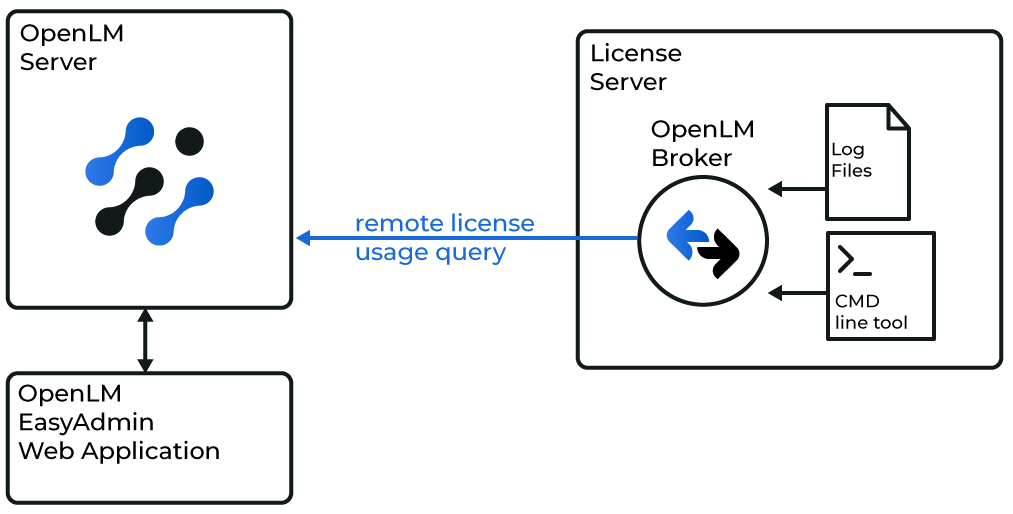 概要図: OpenLM Broker が Sentinel HASP をローカルで照会する様子
この方式では、HASP サーバーにインストールした OpenLM Broker を使用し、コマンドラインユーティリティと使用状況ログを介して照会します。
推奨: 拒否やログベースのデータを含む完全な監視を提供します。
Broker の手動設定
-
Broker UI を
http://localhost:5090/で開きます。 -
License Managers → Add License Manager に移動します。
-
Broker で Add Port をクリックし、HASP サーバーのポート(既定: 5093)を入力します。
-
LM Type を Sentinel HASP License Manager に設定します。
-
Commands で、Sentinel HASP のコマンドラインユーティリティが格納されているフォルダーを参照します。Update をクリックします。
-
(Windows のみ)HASP がサービスとして実行されている場合は、Use Service を有効にして Sentinel HASP License Manager と入力します。
-
Apply をクリックします。
-
data_inquiry で Execute をクリックし、出力が正しいことを確認します。
-
Log Files を右クリック → Add Log File をクリックします。
-
Type を Other に設定し、HASP の使用状況ログファイルを参照します。
-
Apply をクリックし、Broker を再起動します。
OpenLM Platform で Sentinel HASP を承認
- OpenLM Platform にサインインします。
- メニューから License Servers → Pending Server を開きます。
- Sentinel HASP ライセンスマネージャーを選択し、Approve and Merge をクリックします。
連携の検証
- OpenLM Platform で License Servers Live → Server Statistics を開きます。
- Sentinel HASP が緑のステータスで表示されることを確認します。
新規接続の場合、ステータスの反映まで最大 3 分かかります。