Sentinel RMS
本ガイドでは、OpenLM を Sentinel RMS と連携させてライセンス使用状況を監視し、ライセンス統計を生成する方法を説明します。
はじめに
Sentinel RMS を照会するには、次が必要です。
-
OpenLM Platform
-
Sentinel RMS と同じマシンにインストールされた OpenLM Broker v25.x 以降。Broker Hub で承認します。
監視機能
監視機能は、OpenLM Server を単独で使用するか、OpenLM Broker と併用するかによって異なります。
| Report resolution | License totals | License usage | Denials reporting | Borrowed license reporting | Expiration date reporting | Multiple server redundancy |
|---|---|---|---|---|---|---|
| By second | Yes | Yes | Yes | Yes | Yes | No |
-
黄色のセル: OpenLM Server で利用できる機能。
-
青色のセル: OpenLM Server + Broker で利用できる追加機能。
Broker を使用すると、バッファリングされた通信が可能になり、ライセンスマネージャーサービスをリモートで開始または停止できます。
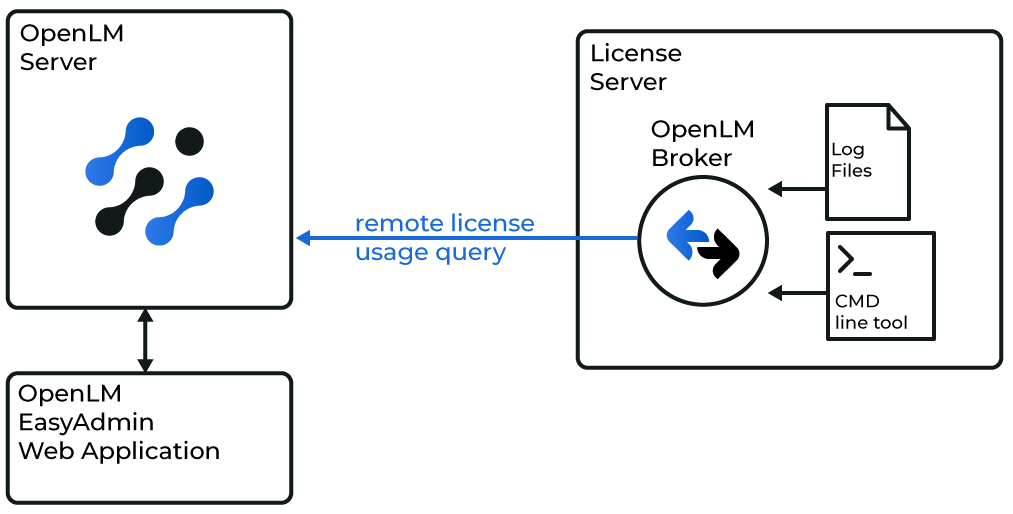 OpenLM Broker が Sentinel RMS をローカルで照会する仕組みの図
Broker が RMS のコマンドラインユーティリティとログファイルを使用して Sentinel RMS をローカルで照会すると、完全な監視機能が得られます。Broker はその後、データを OpenLM Server に転送します。
続行する前に、OpenLM Broker をインストールし設定しておく必要があります。Broker のインストールガイドおよび Broker の設定ガイドを参照してください。
Broker の自動設定
-
Broker UI を
http://localhost:5090/で開きます。 -
License Managers → Detect に移動します。
-
Sentinel RMS が表示されます。
-
内容を検証して保存します。
Broker UI での設定
または、ブラウザーで Broker UI から設定することもできます。
-
Broker UI を
http://localhost:5090/で開きます。 -
License Manager → Add License Manager に移動します。
-
RMS を選択し、ポートを入力して追加します。
-
実行ファイルのパスを確認します。
-
(Windows のみ)サービスを Sentinel RMS License Manager に設定します。
-
data_inquiry を実行し、出力を確認します。
-
必要に応じてベンダー情報を追加します。
-
RMS の使用状況ログ用に Log Files を設定します。
-
変更を保存します。
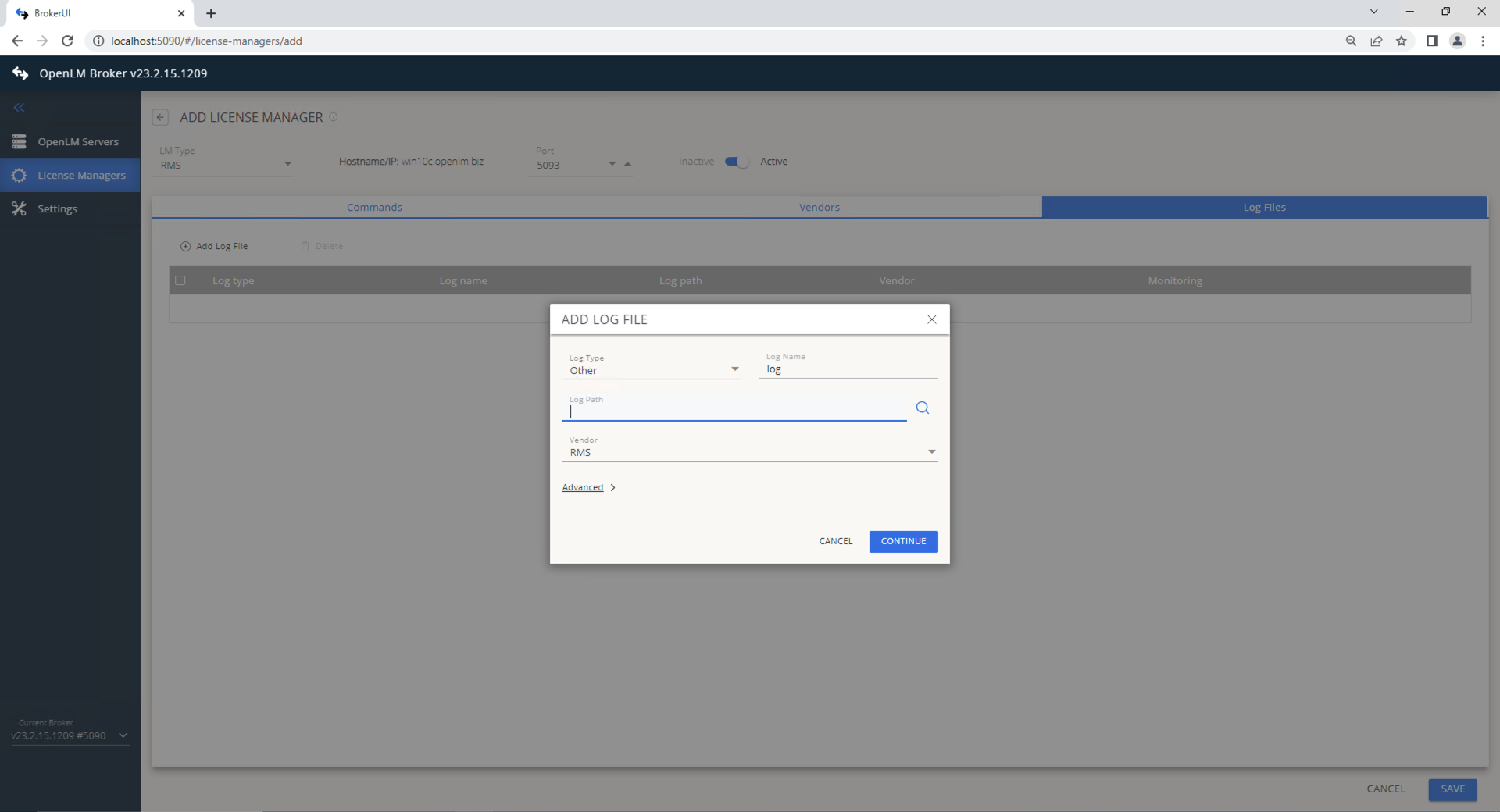 RMS の Broker UI 設定
トークン計算の有効化
-
appsettings.jsonをバックアップします。 -
ファイルを開きます(既定の場所:
C:\Program Files\OpenLM\OpenLM Server\bin)。 -
次のセクションを探します。
},"AspenTokens": {"AspenTechTokensFile": "../config/aspen_tokens_breakdown.json","EnableTokenCalculations": false} -
EnableTokenCalculationsをtrueに変更します。},"AspenTokens": {"AspenTechTokensFile": "../config/aspen_tokens_breakdown.json","EnableTokenCalculations": true} -
ファイルを保存します。
-
OpenLM Server を再起動します。
net stop "OpenLM Server"net start "OpenLM Server" -
OpenLM Server でトークン計算が有効になっていることを確認します。
OpenLM Platform で Sentinel RMS を承認
- OpenLM Platform にサインインします。
- メニューから License Servers → Pending Server を開きます。
- Sentinel RMS ライセンスマネージャーを選択し、Approve and Merge をクリックします。
連携の検証
- OpenLM Platform で License Servers Live → Server Statistics を開きます。
- Sentinel RMS が緑のステータスで表示されることを確認します。
新規接続の場合、ステータスの反映まで最大 3 分かかります。