SlickEdit
SlickEdit は、クロスプラットフォームかつ多言語対応のソースコードおよびテキストエディターです。さまざまなコーディングツールと、作業時間を短縮するプログラミング機能を提供します。SlickEdit 2014 は、9 つの異なるプラットフォームで 40 以上の言語をサポートしています。
SlickEdit の使用は、専用のライセンスマネージャーによってライセンス管理されています。本ガイドでは、SlickEdit ライセンスマネージャーの監視、ライセンス使用状況の追跡、ライセンス統計の収集を行うように OpenLM を設定する方法を説明します。
はじめに
- OpenLM Platform。
- SlickEdit と同じマシンにインストールされ、Broker Hub で承認された OpenLM Broker v25.x 以降。
OpenLM Broker の設定
-
Broker UI を開きます:
http://localhost:5090/。 -
License Managers → Add License Manager に移動します。
-
Downloads ページから最新バージョンの OpenLM Broker をダウンロードしてインストールします。
-
Broker で、ライセンスマネージャーのノードを選択します。Auto-Detect で SlickEdit が見つからなかった場合は、Add Port をクリックします。
-
ポート 27100 で SlickEdit ライセンスサーバー (例: slickedit_license_server) を監視するように Broker を設定します。
-
ベンダー名を SlickEdit に設定します。
-
Commands ノードで、selicutil.exe 実行ファイルのフルパスを入力します。Update をクリックし、Apply をクリックします。
-
次の図のように、Status と Data_inquiry の SlickEdit コマンドを設定します。
<fullpath>は、selicutil.exe の実際のパスに置き換えてください。 -
SlickEdit 向けの Broker コマンドを設定します。
- Restart Broker をクリックします。
- Broker は Broker Web UI からも設定できます。
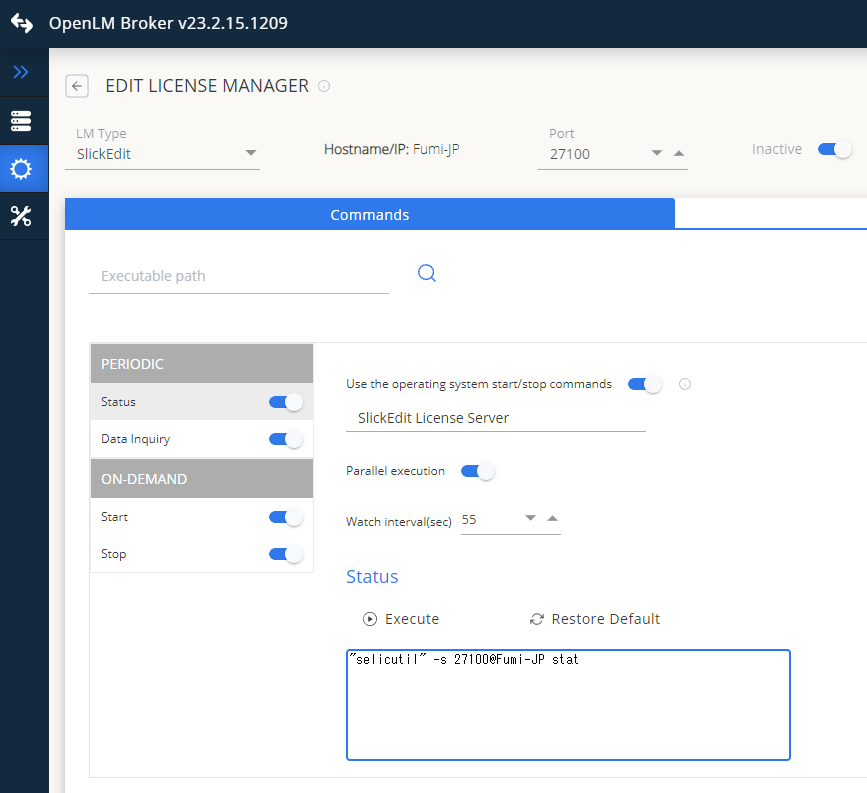 Broker Web UI で SlickEdit を設定する
OpenLM Platform で SlickEdit を承認
- OpenLM Platform にサインインします。
- メニューから License Servers → Pending Server を開きます。
- SlickEdit ライセンスマネージャーを選択し、Approve and Merge をクリックします。
連携の検証
- OpenLM Platform で License Servers Live → Server Statistics を開きます。
- SlickEdit が緑のステータスで表示されることを確認します。
新規接続の場合、ステータスの反映まで最大 3 分かかります。