Zoo License Manager
本ガイドでは、ライセンス使用状況を監視して統計を収集するために、OpenLM を McNeel の Zoo License Manager と連携させる方法を説明します。
はじめに
Zoo License Manager を監視するには、次を確認してください。
- OpenLM Platform。
- Zoo と同じマシンにインストールされ、Broker Hub で承認された OpenLM Broker v25.x 以降。
監視機能
OpenLM は、Zoo License Manager から次を収集します。
| Report resolution | License totals | License usage | Denials reporting | Borrowed license reporting | Expiration date reporting | Multiple server redundancy |
|---|---|---|---|---|---|---|
| By second | Yes | Yes | Yes* | No | No | No |
- 拒否は Limit Reached として分類されます。読み取り可能な Feature Name を持つ拒否のみが記録されます。
Zoo は OpenLM Broker 経由で照会されるため、次のメリットもあります。
-
OpenLM Server へのバッファリングされた通信 (ネットワーク障害に耐性があります)。
-
ライセンスサービスをリモートで開始/停止する機能。
-
使用状況レポートの 1 秒単位の解像度。
OpenLM Broker の設定
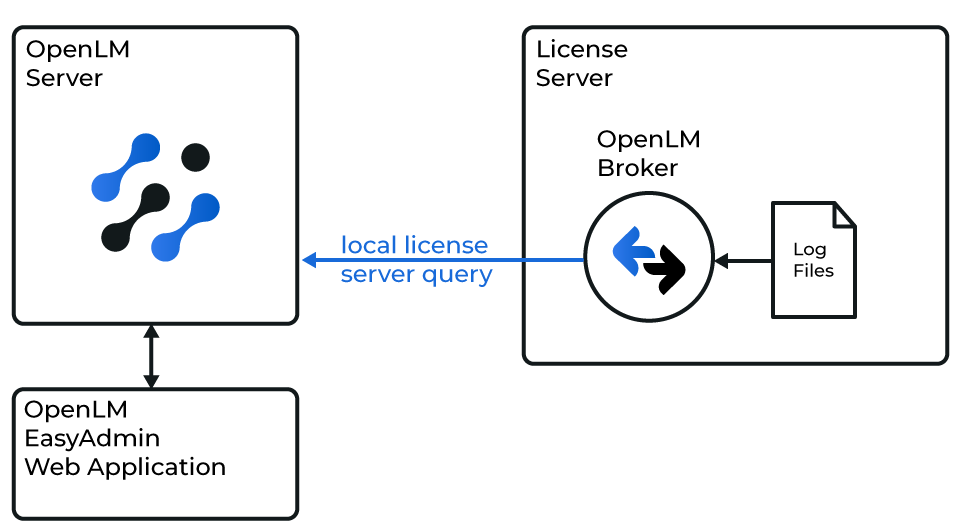 OpenLM と Zoo License Manager の連携の概要図
OpenLM Broker は、Zoo と同じマシンにインストールし (インストールガイド)、OpenLM Server に接続する必要があります (構成ガイド)。
オプション 1 — 自動検出
-
Broker UI を開きます:
http://localhost:5090/。 -
License Managers → Detect に移動します。
-
Zoo が表示されます。
-
検証して保存します。
オプション 2 — 手動で追加
自動検出が失敗した場合:
-
Broker UI を開きます:
http://localhost:5090/。 -
License Managers → Add License Manager に移動します。
-
License Manager Type から Zoo → Apply を選択します。
-
OpenLM Web Interface に無効な日付や言語が表示される場合:
- Zoo Output Language: OS のシステムロケールに合わせます。
- Zoo Date Time Format: Zoo の出力日付形式に合わせます。カスタム形式を設定することもできます。
-
Vendors で、Vendor Name to Be Filled を McNeel に置き換え、Apply をクリックします。
-
ログファイルを追加します: Log Files → Add Log File → Other。
-
CSV 形式の Zoo ログファイルを指定します (デフォルト: C:\ProgramData\McNeel\Zoo#.#\Usage。#.# はバージョンで、例: 6.0)。
-
Advanced で、Watch Files by Pattern をオンにします。
-
Apply → Restart Broker をクリックします。
-
OpenLM Server の構成を続行します。
OpenLM Platform で Zoo License Manager を承認
- OpenLM Platform にサインインします。
- メニューから License Servers → Pending Server を開きます。
- Zoo License Manager ライセンスマネージャーを選択し、Approve and Merge をクリックします。
連携の検証
- OpenLM Platform で License Servers Live → Server Statistics を開きます。
- Zoo License Manager が緑のステータスで表示されることを確認します。
新規接続の場合、ステータスの反映まで最大 3 分かかります。