Cloudflare
Cloudflare は、CDN、DDoS 防御、DNS などのサービスを提供する Web パフォーマンスおよびセキュリティプラットフォームです。組織の Web サイトを高速化し、より安全で信頼性の高いものにします。
はじめに
Cloudflare の監視を開始するには、次のコンポーネントと権限が用意されていることを確認してください。
- OpenLM コンポーネント: Broker Hub で承認された OpenLM Cloud Broker。
- プラットフォーム固有の要件: 分析データおよびユーザーデータに対する読み取り権限を持つグローバル API キーまたは特定の API トークンを生成するには、Cloudflare アカウントへの管理者アクセスが必要です。
データ収集の構成
ユーザートークンと Account API token のどちらを使用するかを決めます。ユーザーに関連付けられないサービストークンを使用したい場合で、かつ使用したい API エンドポイントが対応している場合は、Account API トークンを使用します。
Cloudflare ダッシュボード ↗ で、ユーザートークンの場合は My Profile → API Tokens を開きます。Account トークンの場合は Manage Account → API Tokens を開きます。
Create Token を選択します。
トークンの権限を変更します。権限グループ(Account、User、または Zone)を選択した後、トークンに付与するアクセスレベルを選択します。ほとんどのグループには Edit または Read のオプションがあります。Edit は完全な CRUDL(作成、読み取り、更新、削除、一覧表示)アクセスであり、Read は読み取り権限と、必要に応じて一覧表示の権限です。詳細については、使用可能なトークンの権限を参照してください。
トークンがアクセスを許可されるリソースを選択します。たとえば、ゾーン example.com に Zone DNS Read アクセスを付与すると、そのトークンはその特定のゾーンの DNS レコードのみを読み取れるようになります。それ以外のゾーンでは、DNS レコードの読み取り操作はエラーを返します。そのゾーンに対するそれ以外の操作もエラーを返します。
(オプション)Client IP Address Filtering および TTL(time to live)フィールドで、トークンの使用方法を制限します。
Continue to summary を選択します。
トークンの概要を確認します。調整するには Edit token を選択します。トークンは作成後に編集することもできます。
Create Token を選択して、トークンのシークレットを生成します。
シークレットを安全な場所にコピーします。
- 認証情報を追加する: OpenLM Cloud Broker ダッシュボードで Cloudflare 連携を見つけ、アカウント ID と API トークンを入力します。
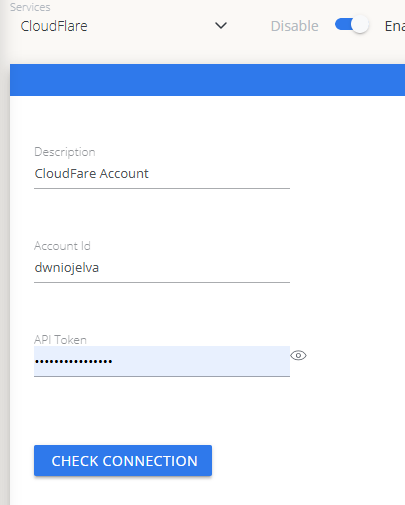 Cloud Broker での Cloudflare 認証情報の設定
OpenLM Platform で Cloudflare を承認
- OpenLM Platform にサインインします。
- メニューから License Servers → Pending Server を開きます。
- Cloudflare データソースを選択し、Approve and Merge をクリックします。
連携の検証
- OpenLM Platform で Allocation を開きます。
- Cloudflare の利用状況データが表示されることを確認します。
承認後、データの反映まで最大 3 分かかります。
レポートの閲覧
- ユーザーアクティビティの推移 — プラットフォームで活発に活動しているユーザーを把握し、シートの再配分に活用できます。
- 期限切れまたは未使用ライセンス — 非アクティブなユーザーを特定し、シートを回収します。