Float
Float は、チームがプロジェクトを計画し、リソースをスケジュールし、ワークロードを管理できるよう支援するリソース管理プラットフォームです。チームの稼働状況とプロジェクトのタイムラインを視覚的に把握できます。
はじめに
Float の監視を開始するには、次のコンポーネントと権限が用意されていることを確認してください。
- OpenLM コンポーネント: Broker Hub で承認された OpenLM Cloud Broker。
- プラットフォーム固有の要件: 必要な読み取り権限を持つ API キーを生成するには、Float アカウントへの管理者アクセスが必要です。
データ収集の構成
- API アクセスを有効化する: Float アカウント設定で Integration Menu に移動し、次に API Key を開きます。新しい API Key を作成します。
- 認証情報を追加する: OpenLM Cloud Broker ダッシュボードで Float 連携を見つけ、API キーを入力します。
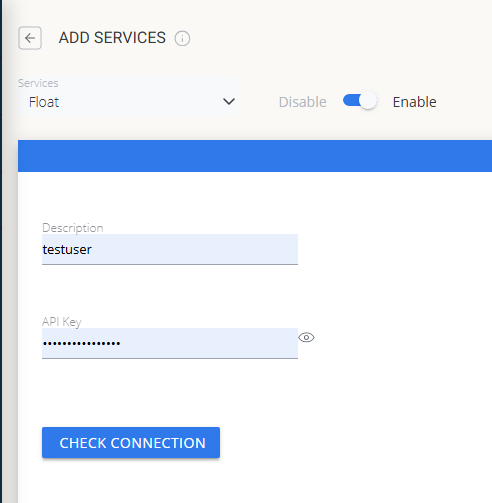 Cloud Broker での Float 認証情報の設定
OpenLM Platform で Float を承認
- OpenLM Platform にサインインします。
- メニューから License Servers → Pending Server を開きます。
- Float データソースを選択し、Approve and Merge をクリックします。
連携の検証
- OpenLM Platform で Allocation を開きます。
- Float の利用状況データが表示されることを確認します。
注意
承認後、データの反映まで最大 3 分かかります。
レポートの閲覧
- ユーザーアクティビティの推移 — プラットフォームで活発に活動しているユーザーを把握し、シートの再配分に活用できます。
- 期限切れまたは未使用ライセンス — 非アクティブなユーザーを特定し、シートを回収します。