API
The OpenLM REST API lets you query license data programmatically: active feature usage, historic sessions, denials, license servers, and users. The REST API stabilized in V21.12. Send standard HTTP requests to the OpenLM Server and receive JSON responses.
Versions and compatibility
Review these points before you migrate a v4.x or v5.x integration:
- The old v4.x XML/SOAP API is not supported in v5.6, V21.12, and later releases.
- Some XML/SOAP methods remain available at
/OpenLM.Server.Services/AdminAPI/web/{adminApiMethod}. - Some v5.x REST endpoints changed in V21.12 and later. Confirm paths and parameters in Swagger before you upgrade.
The Swagger page lists every API method intended for customer use, with current parameters and schemas, at https://<fqdn>:5015/swagger/index.html. Treat Swagger as the source of truth; the catalog on this page reflects a V22 build.
Base URL and conventions
Send requests to the OpenLM Server on port 5015:
http://<openlm_server>:5015/api/v<version>/<method>
- The current API version is
1, so most paths begin with/api/v1/. - Agent listener methods use the unversioned prefix
/api/agentapi/. - Responses are JSON. Timestamps use UTC.
- Replace
<openlm_server>and<identity_server>with your own host names. Usehttpswhen TLS is configured.
Authentication and authorization
Authentication uses the OAuth 2.0 password grant. Generate API credentials once, exchange them for a bearer token, then send that token with every request.
OpenLM splits identity from authorization across two services:
| Service | Role | Requires |
|---|---|---|
| OpenLM Identity Service | Authentication. Issues the access token (security token). | client_id and client_secret (an authorization file) |
| OpenLM Server | Authorization. Serves the API methods. | Username and password (your OpenLM login) |
If you don't use Identity Service Security Mode, you can call the API without a bearer token. In that case, skip the token steps.
Generate a client ID and client secret in EasyAdmin
- In the OpenLM user interface, go to Administration > System & Security.
- Select Security > Authorization to open Client Authorization.
- Select Add.
- For Type, select OpenLM Server API.
- Copy the generated Client ID and Secret Key, or select Download to save the authorization file. Store the secret securely; you can't retrieve it again.
Get a security token
Exchange your credentials for an access token at the Identity Service token endpoint:
POST http://<identity_server>:5000/connect/token
Content-Type: application/x-www-form-urlencoded
Send these form fields:
| Field | Value |
|---|---|
grant_type | password |
username | Your OpenLM username |
password | Your OpenLM password |
scope | openlm.server.scope |
client_id | The client ID from the previous step |
client_secret | The client secret from the previous step |
Request a token with PowerShell:
$uri = "http://<identity_server>:5000/connect/token"
$header = @{ "Content-Type" = "application/x-www-form-urlencoded" }
$body = @{
    "grant_type"    = "password"
    "username"      = "admin"
    "password"      = "<password>"
    "scope"         = "openlm.server.scope"
    "client_id"     = "openlm.server.api.<id>.none"
    "client_secret" = "<client_secret>"
}
$response = Invoke-WebRequest -Method POST -Uri $uri -Headers $header -Body $body
$response.Content
Request a token with curl:
curl -X POST "http://<identity_server>:5000/connect/token" \
  -H "Content-Type: application/x-www-form-urlencoded" \
  -d "grant_type=password" \
  -d "username=admin" \
  -d "password=<password>" \
  -d "scope=openlm.server.scope" \
  -d "client_id=openlm.server.api.<id>.none" \
  -d "client_secret=<client_secret>"
The response contains the token:
{
  "access_token": "eyJhbGciOi...",
  "token_type": "Bearer",
  "scope": "openlm.server.scope"
}
If you're already logged in to the OpenLM user interface, you can copy an active token from the browser:
- Open your browser developer tools (F12).
- Log in to the user interface.
- Select any network request, then copy the
Authorization: Bearervalue from its request header.
Send the token with each request
Add the token to the Authorization header of every OpenLM Server request:
Authorization: Bearer <security_token>
The client secret, password, and token grant access to your license data. Keep them out of source control and shared documents. The values shown here are placeholders.
Use Swagger to test the API
Swagger UI lists every available method and runs requests from the browser. Open it at http://<openlm_server>:5015/swagger/index.html.
- Get a token from Postman or the Identity Service.
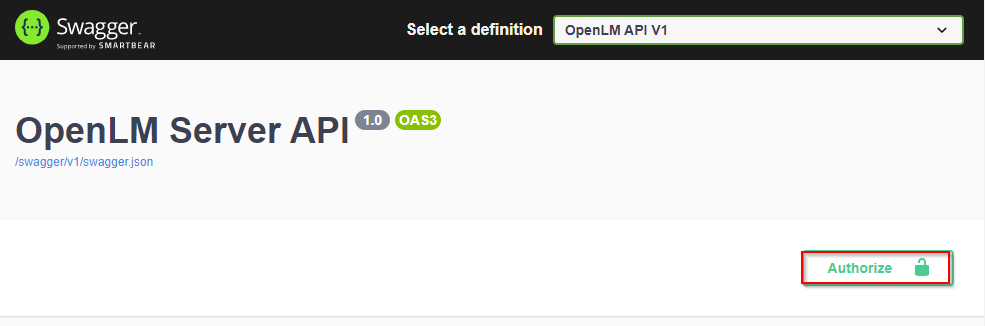
- In Swagger UI, select Authorize.
- Enter
Bearer, a space, and your token, then select Authorize.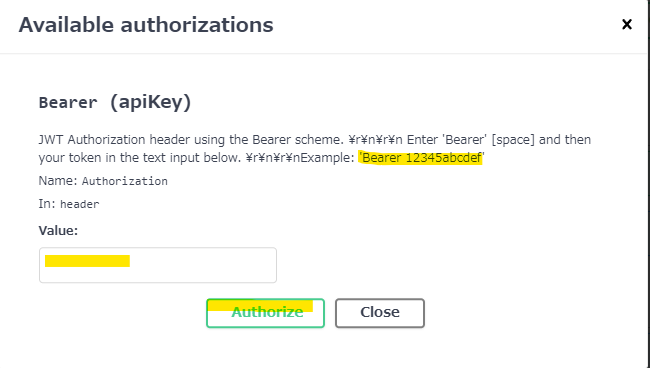
- Select the API method you want to run.

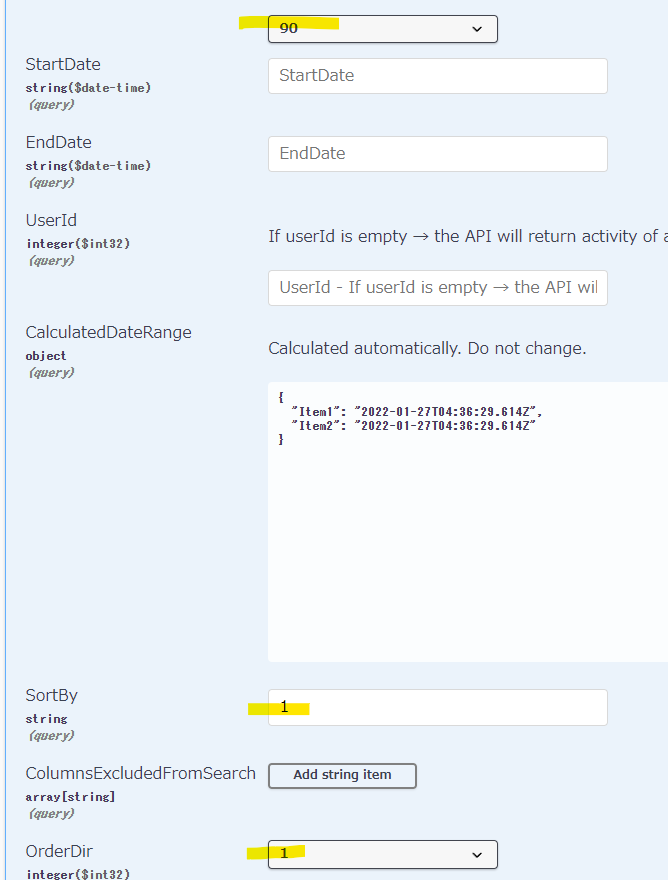
- Select Try it out and enter the required parameters. The current API version is
1.
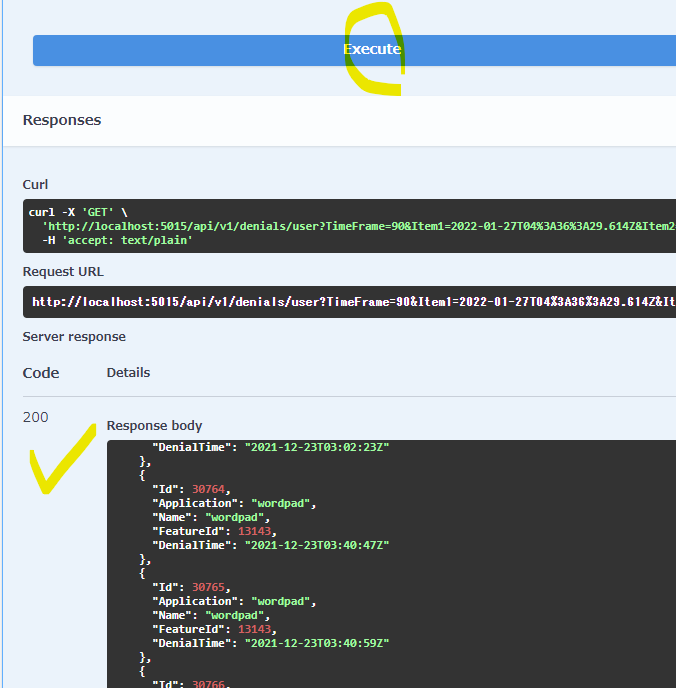
- Select Execute and review the response code and body.
Enter the token in the form Bearer <token>, for example Bearer eyJhbGci.... After you authorize, the lock icons on each method close.
Use Postman to call the API
The OpenLM Postman collection includes ready-made requests and an environment, so you fetch a token once and reuse it. Watch the setup video, or follow these steps.
- Import the sample collection: v21 APIs example collection.
- Set the environment variables in the following table.
- Run Get Client Api Token to fetch the token. Postman stores it for the other requests.
- Send any request, for example
GET {{openlmserver_url}}/api/v{{apiversion}}/features/lookup, with Authorization set to Bearer Token.
| Variable | Example value |
|---|---|
openlmserver_url | http://<openlm_server>:5015 |
apiversion | 1 |
identityservice_url | http://<identity_server>:5000 |
client_id | openlm.server.api.<id>.none |
client_secret | <client_secret> |
username | admin |
password | <password> |
Store credentials in environment variables, not in request bodies. The data stays secure when you share a collection.
Endpoint reference
The following methods appear in Swagger for a V22 build. Each method and path is shown as registered; query parameters are listed where documented. Confirm the complete, current list in Swagger.
Agents listener
| Method | Description |
|---|---|
POST /api/agentapi/postmessage | Post a message from an agent to the listener. |
GET /api/agentapi/test | Test that the agent listener endpoint responds. |
Broker commands (v1)
| Method | Description |
|---|---|
GET /api/v1/broker/commands | Return broker commands. |
PATCH /api/v1/broker/commands | Update the status of broker command execution. |
A related BrokerCompositeMessageV1 group also appears in Swagger. Check Swagger for its current methods.
Features (v1)
| Method | Description |
|---|---|
GET /api/v1/features | Return the list of features per license server. |
GET /api/v1/features/usage | Return usage details of active sessions for a specific feature. |
GET /api/v1/features/totalusage | Return the total feature usage of active sessions. |
GET /api/v1/features/usertop | Return the top 10 feature usage per user, in descending order. |
GET /api/v1/features/useractivity | Return historic and current user activity for the selected time frame. Use a predefined TimeFrame, or set StartDate and EndDate. |
GET /api/v1/features/usercurrentactivity | Return current user activity. |
GET /api/v1/features/by-vendor | Return features by vendor and feature name. |
GET /api/v1/features/lookup | Return a license feature lookup. The activeOnly query parameter filters the result to active licenses. |
Sessions and users (v1)
| Method | Description |
|---|---|
GET /api/v1/sessions | Return license activity sessions. Query parameters: StartDateUtc, EndDateTimeUtc, UserIds, PageSize, PageNumber. |
GET /api/v1/users/lookup | Return users as Id and Name pairs. |
Postman collection samples
The v21 APIs samples collection groups these requests. Each one calls the matching method under /api/v<version>/:
- Get Client Api Token
- license servers — lookup
- license servers — statistics
- license servers — full info for server
- features
- features — total usage
- features — usage
- features — useractivity
- features — usercurrentactivity
- denials
- sessions
- users — lookup
Build a license activity report
This example reproduces a License Activity report from EasyAdmin: the sessions for one user on one day. In EasyAdmin, the same filter (user M.Eve.Leonard, 2022-11-09) returns three sessions.
Get the user ID
Look up the user to find their numeric ID.
GET {{openlmserver_url}}/api/v{{apiversion}}/users/lookup
Authorization: Bearer <security_token>
Find the user in the response and note the Id:
{
  "Id": 597,
  "Name": "M.Eve.Leonard"
}
Get the license activity
Request the sessions for that user within the time frame. Use UTC timestamps.
GET {{openlmserver_url}}/api/v{{apiversion}}/sessions
  ?StartDateUtc=2022-11-09T00:00:00.000Z
  &EndDateTimeUtc=2022-11-09T23:59:00.000Z
  &UserIds=597
  &PageSize=100
  &PageNumber=1
Authorization: Bearer <security_token>
The response returns the three sessions, each with UTC timestamps and feature details. This matches the EasyAdmin report.
The API returns and expects UTC timestamps. Convert to local time in your own code if your report needs it.
Sample code
OpenLM provides a C# sample that authenticates and calls a method end to end: Program.cs (PDF).
If you don't use Identity Service Security Mode, you can call the API without a bearer token, so you don't need the token request in the sample.