Atlas MongoDb
Atlas MongoDB Usage Monitoring
About Atlas MongoDB
Atlas MongoDB is a cloud-based database service for modern applications. It provides a flexible, scalable, and secure way to manage data. Organizations monitor Atlas MongoDB usage to manage data storage costs, optimize database performance, and ensure compliance. This is similar to monitoring other cloud database services like Firebase or Azure.
Prerequisites
To begin monitoring Atlas MongoDB, ensure you have the following components and permissions in place:
- OpenLM Components: OpenLM Cloud Broker and OpenLM SLM are required.
- Platform-specific Requirements: You'll need administrative access to your MongoDB Atlas account to generate a public and private API key with the necessary read permissions for cluster and usage data.
Configuring data collection
- Follow these step-by-step instructions to set up data collection for Atlas MongoDB in OpenLM Cloud Broker:
- In Atlas, go to the Organization Access Manager page.
- If it's not already displayed, select your desired organization from the Organizations menu in the navigation bar.
- Select Organization Access from the Access Manager menu in the navigation bar.
- Click Access Manager in the sidebar.
- The Organization Access Manager page displays.
- Click Add new Service Account.
- Enter the service account information.
- Enter a Name.
- Enter a Description.
- Select a duration from the Client Secret Expiration menu.
- From the Organization Permissions menu, select the new role or roles for the service account.
- Click Create.
- Copy and save the Client Secret
- Add an API Access List Entry.
- Click Add Access List Entry.
- Enter an IP address or CIDR block from which you want Atlas to accept API requests for this service account.
- You can also click Use Current IP Address if the host you are using to access Atlas will also make API requests using this service account.
- Click Save.
Add Credentials: In the OpenLM Cloud Broker dashboard, find the Atlas MongoDB integration and enter your Organization ID, Public Key and Private Key.
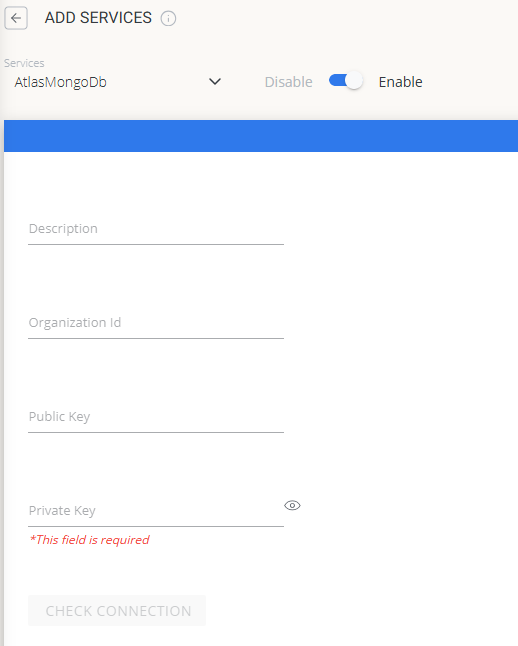
Verify Connection: Test the connection to ensure that OpenLM can successfully retrieve data.
Approve in OpenLM: Approve the new data source within the License Servers section.
See Data: Usage data for Atlas MongoDB will now be visible in the OpenLM Allocation service.
Viewing reports
Access your reports to analyze usage patterns.
- User Activity Trends: Monitor database access and usage patterns.
- Expired/Unused License Reports: Identify and reclaim licenses from inactive users.